

Top-Rated Home Internet Providers in Charleston SC If You’re Leaving Xfinity

Tired of Xfinity’s bill shock — Charleston finally has choices
AT&T now brings 300–5,000 Mbps symmetrical fiber to many city addresses, while new 5G and refreshed cable plans fill the streets fiber hasn’t reached. Because speed and price still vary house by house, the guide ahead compares Charleston’s strongest wired, wireless, and rural alternatives—so you can ditch Xfinity without losing a single Zoom call.
Quick comparison: Charleston’s leading alternatives at a glance
Before we get into the reviews, here’s how the front-runners compare. Pick the service that matches your priorities, then keep reading for street-level details.
| Provider | Connection | Advertised speeds | Uploads | Starting price† | Standard price‡ | Contract | Data cap |
| AT&T Fiber | Fiber | 300 Mbps – 5 Gbps | Symmetrical | $55 | $65–$180 (varies by tier) | None | None |
| WOW! | Cable | 300 Mbps – 2 Gbps* | Varies by tier | $30 | Rate locked for life with the $5 Price Lock add-on | None | Check your address |
| IQ Fiber | Fiber | 250 Mbps – 5 Gbps | Symmetrical | $65 | Same (flat-rate) | None | None |
| Spectrum | Cable | 100 Mbps – 1 Gbps | Up to 35 Mbps | $30 | $50–$105 | None | None |
| T-Mobile 5G Home | Fixed wireless | 87 – 415 Mbps | 15 – 60 Mbps uploads | $50 | Same (price lock) | None | None |
| Verizon 5G Home | Fixed wireless | 85 – 300 Mbps | 10 – 60 Mbps uploads | $60 | Same (3–5 yr lock) | None | None |
† Starting prices for standalone internet with AutoPay where required.
‡ Standard price is what you’ll pay after any introductory discount; flat-rate providers match the starting figure.
*WOW! offers Internet 300, 600, 1 Gig, and 2 Gig plans in Charleston; not all speeds are available at every address.
A headline speed means little if the fiber stops a block away. Run the provider’s address checker, including your apartment number, before you choose a plan.
WOW! internet: best for shoppers who want a lifetime price-lock option
Looking for a regional wired alternative? WOW! is a Charleston, SC internet provider serving West Ashley, James Island, and parts of Mount Pleasant, including ZIP codes 29407, 29412, and 29464, with plans from $30 a month and an optional $5 Price Lock for Life.
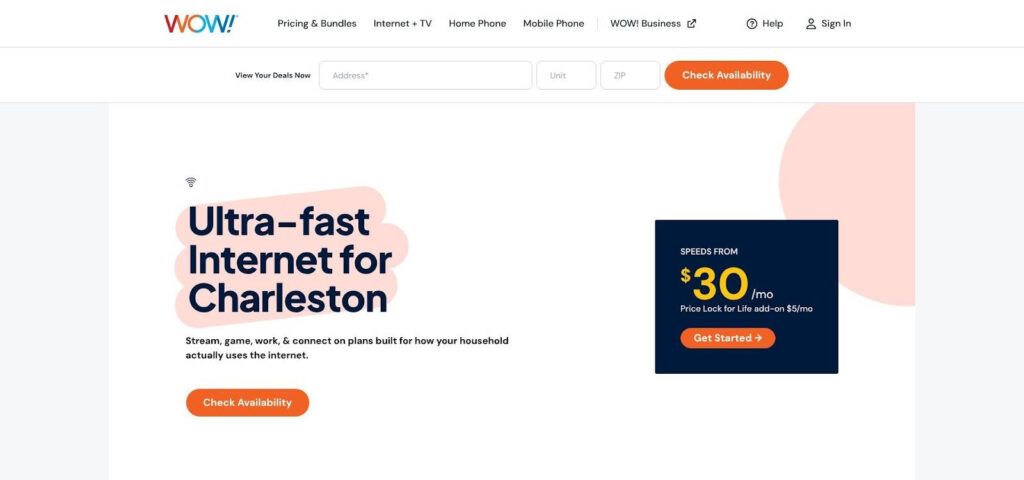
WOW! Charleston internet price lock address checker screenshot
If paying the same bill years from now sounds dreamy, WOW!’s optional Price Lock for Life delivers. Add it to any plan for $5 a month and your rate stays put for as long as you’re a customer, as long as you keep the same speed: no introductory pricing and no rate hikes after year one.
Charleston plans are sized by household:
- Internet 300 for smaller families: surfing, social, shopping, SD and HD streaming, casual gaming.
- Internet 600 for households of four or more: working from home, HD streaming, online gaming.
- Internet 1 Gig for heavy activity: video calls, 4K streaming, no-lag gaming, multiple smart-home devices.
- Internet 2 Gig for larger households: many devices at once, multi-player gaming, whole-home smart controls.
Every plan is contract-free, includes a WiFi modem (or use your own), and comes with built-in security that blocks malicious domains and URLs. A free self-install kit gets you online in three steps, or WOW! can install it for you, and a 30-day money-back guarantee lets you test the line through Charleston’s afternoon storms. Add Whole-Home WiFi and you start with two eero devices for mesh coverage, with 24/7 award-winning support behind it all.
Who wins with WOW!?
Renters tired of promo whiplash, work-from-home households that value billing stability, and anyone chasing a “set-it-and-forget-it” budget in West Ashley, James Island, or Mount Pleasant.
For pure bill predictability and friction-free setup, WOW! tops Charleston’s price-lock shortlist.
AT&T Fiber: best overall fiber option
Why AT&T Fiber leads the pack
Symmetrical speed changes everything. A 500 Mbps plan truly moves files at 500 Mbps both ways, so Zoom stays crisp, cloud backups finish before bed, and smart-home cameras never choke.
Consistency seals the deal. Light-based fiber doesn’t share radio spectrum or aging copper, so performance barely blinks when the cul-de-sac hops on Netflix. AT&T’s Broadband Facts label for Fiber 300 lists approximately 396 Mbps down, 385 Mbps up, and 10 ms latency. That’s quick enough for gamers and day-traders alike.
Reach matters. AT&T has laid more fiber mileage in Charleston than any other residential provider, stretching from the peninsula to Summerville. Availability still flips block by block, but your odds of qualifying beat any boutique network. Add an ACSI score of 79 and a J.D. Power South rating of 611, and AT&T Fiber earns our overall crown.
| Plan | Advertised speed | Typical label speed† | Promo price* | Contract | Data cap |
| Fiber 300 | 300 Mbps | 396 × 385 Mbps | $55 | None | None |
| Fiber 500 | 500 Mbps | 550 × 540 Mbps | $65 | None | None |
| Fiber 1 Gig | 940 Mbps | 940 × 880 Mbps | $80 | None | None |
| Fiber 2 Gig | 2 Gbps | 2 Gbps symmetrical | $125 | None | None |
| Fiber 5 Gig | 5 Gbps | 5 Gbps symmetrical | $180 | None | None |
*Prices with AutoPay. Taxes and fees add a few dollars.
†Typical speeds from AT&T performance labels; values may vary by network load.
Even with AT&T’s broad footprint, confirm eligibility down to your apartment number before canceling another service.
IQ Fiber: best new Charleston fiber entrant
Charleston finally has a flat-rate challenger. Jacksonville-based IQ Fiber is building across West Ashley and Mount Pleasant, promising fiber speeds with no promo-then-price-hike games.
Every plan follows the same recipe: one all-in monthly price, symmetrical speed, no contract, no data cap, pro install, and a Wi-Fi 7 system that covers more square feet than most mesh kits.
| Plan | Advertised speed | Monthly price† | Contract | Data cap |
| Essential | 250 Mbps | $65 | None | None |
| Smart | 500 Mbps | $75 | None | None |
| Gig | 1 Gbps | $85 | None | None |
| Ultra | 2 Gbps | $95 | None | None |
| Hyper | 5 Gbps | $125 | None | None |
†Flat-rate pricing; taxes and fees are already baked in.
Early adopters praise the simple billing, and symmetrical fiber keeps uploads as fast as downloads.
Footprint caveat. Crews currently focus on Savannah Highway, Bees Ferry Road, and north-side Mount Pleasant subdivisions. Peninsula and James Island addresses remain future-tense, but you can pre-register on IQ Fiber’s build map and get an email the moment splicing reaches your street.
Bottom line: if your address qualifies, IQ Fiber rivals AT&T on raw performance and shines for billing transparency. Jump early and you’ll lock pricing before the second-wave rush.
Spectrum: best wired alternative in much of Summerville
Summerville and Ladson sit at the fringe of Charleston’s fiber boom, but coax still rules, and Spectrum owns most of it. If your address lands within its core footprint, you can hit gigabit downloads without installing a new ONT or waiting for grant-funded trenching.
| Plan | Advertised speed | Promo price* | Standard price | Upload cap | Modem | Wi-Fi |
| Internet 100 | 100 Mbps | $30/mo | $50/mo | 10 Mbps | Free | +$10 |
| Internet 500 | 500 Mbps | $40/mo | $85/mo | 20 Mbps | Free | +$10 |
| Internet Gig | 1 Gbps | $60/mo | $105/mo | 25 Mbps | Free | Wi-Fi included |
*One-year promo.
Downloads can reach gigabit levels, but uploads stay modest. Gamers who stream or families backing up terabytes to iCloud will notice that limit.
Geography is the real caveat. Spectrum is scarce on the downtown peninsula, West Ashley, and Mount Pleasant. Its strength lies west of the Ashley River and deep into Dorchester County. Enter your ZIP and house number into the checker; a three-mile move can erase the company from your options.
If your driveway sits inside Spectrum’s coax grid, you’ll get strong download punch, no contracts, and aggressive promo pricing—everything many ex-Xfinity customers want while they wait for fiber crews to arrive.
T-Mobile 5G Home Internet: best no-wire alternative
Skip trenching and boot a gray gateway in about 15 minutes. That’s the pitch behind T-Mobile 5G Home Internet.
| Plan | Typical speed† | Promo price* | With Magenta bundle | Key extras |
| Rely | 87–318 Mbps | $50/mo | $35/mo | Gateway, no contract |
| Amplified | 133–415 Mbps | $60/mo | $45/mo | Adds Wi-Fi extender |
| All-In | 133–415 Mbps | $70/mo | $55/mo | Best tower priority |
*A five-year price guarantee applies. A one-time $35 connection charge appears on the Broadband Facts label. Taxes and fees add a few dollars.
†Official performance ranges from T-Mobile’s network-performance policy.
Performance depends on tower load, not street wiring: speeds dip at dinnertime and rise overnight. That is solid for 4K streaming, though fast-twitch gamers may notice jitter.
Placement matters: brick, HVAC ducts, and live oaks sap signal. Set the gateway by a window facing the tower, then speed-test during your busiest hour. A 15-day trial covers return shipping if evening congestion drags speeds below comfort.
Where it shines: renters avoiding install fees, homeowners who want a backup line, and digital nomads now allowed limited portability. Heavy uploaders or low-ping shooters should try fiber first.
Bottom line: T-Mobile 5G Home can’t match fiber uploads, but its $35-per-month bundle price and five-year lock provide a predictable alternative to traditional promotional pricing and get you online before your coffee cools.
Verizon 5G Home Internet: best for Verizon mobile customers
Already on a Verizon Unlimited phone plan? Bundling can trim up to $30 a month from 5G Home Internet and lock the rate for three to five years, making it Charleston’s most affordable no-contract bundle.
Setup mirrors T-Mobile. Plug in the Wi-Fi 6E router, finish in the My Verizon app, and you’re online without a technician. The entry tier advertises about 85 Mbps, while the top plan often clears 300 Mbps where signal is strong. Uploads run about a third of download, so they work for photo backups but not for live streaming.
Verizon’s edge is tower density. Ultra Wideband small cells line downtown and the Highway 17 corridor, giving condo dwellers better odds of a strong signal through brick. The trade-off is congestion: busy evenings can pull speeds down to the low hundreds.
There are no equipment or activation fees, and a 30-day trial lets you return the router if speeds disappoint.
Choose Verizon 5G Home when you already pay Verizon for mobile, want one predictable bill, and live where installers can’t run new lines.
Starlink: best satellite option
When trenches hit marsh and cell bars fade to one lonely dot, Starlink’s low-Earth-orbit constellation keeps humming overhead, making it ideal for barrier-island cabins, rural hunt camps, and shrimp boats waiting out hurricane season.
| Plan | Advertised speed | Hardware cost | Monthly price* | Data cap |
| Residential 100 | Up to 100 Mbps | $299 (small dish) | $55 | None |
| Residential 200 | Up to 200 Mbps | $599 (standard) | $85 | None |
| Max | 250+ Mbps | $2,500 (high-perf) | $130 | None |
*Month-to-month billing.
Most users finish setup in about 30 minutes: mount the dish, plug in, let it orient, and run a speed test. Low-orbit latency is far better than legacy geostationary links.
Limitations remain. Trees are public enemy number one; even light sway can break line-of-sight. Power failures drop the modem unless you add a UPS. And at $85 plus equipment, Starlink costs more than entry-level fiber, so view the bill as the price of connectivity where no wire will go.
If fiber and 5G miss your address but you have a clear southern sky, Starlink can upgrade life from dial-up patience to modern streaming overnight.
Internet provider availability by Charleston neighborhood
Fiber stops, cable footprints zigzag, and 5G tower density shifts block to block. Use this matrix as a compass, then type your exact address, unit number included, into each provider’s checker.
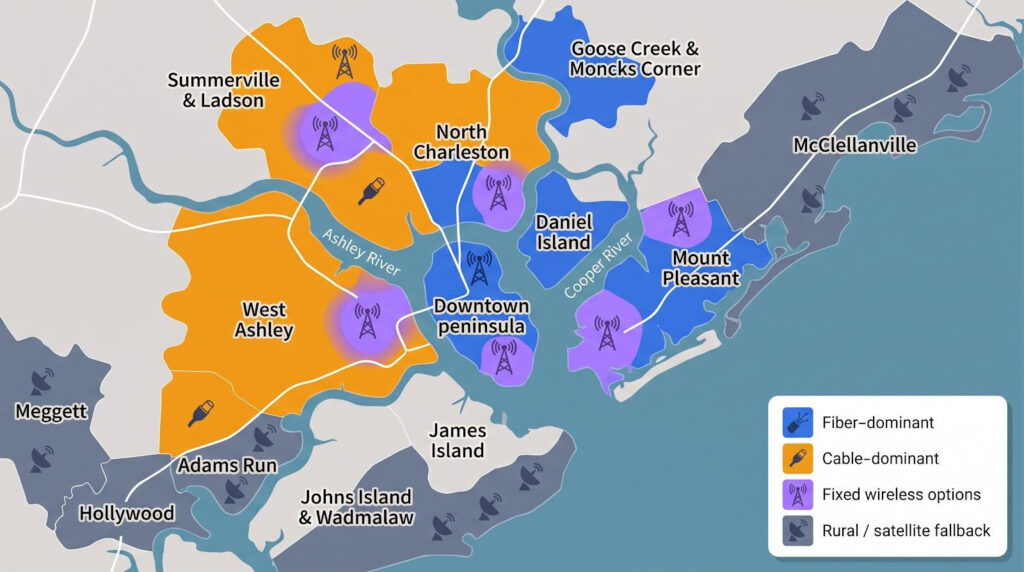
| Neighborhood / ZIPs | Primary wired options | Fixed-wireless options | Satellite fallback |
| Downtown peninsula (29401, 29403) | AT&T Fiber (pockets) | T-Mobile 5G Home, Verizon 5G Home | — |
| West Ashley (29407, 29414) | WOW! Cable, IQ Fiber, AT&T Fiber | T-Mobile 5G Home, Verizon 5G Home | — |
| James Island (29412) | WOW! Cable, AT&T Fiber (spots) | T-Mobile 5G Home, Verizon 5G Home | Starlink for heavy-tree lots |
| Johns Island & Wadmalaw (29455, 29487) | AT&T Fiber (pockets), grant-built cable | Verizon 5G Home, T-Mobile 5G Home | Starlink |
| Mount Pleasant (29464, 29466) | AT&T Fiber, IQ Fiber, WOW! Cable | T-Mobile 5G Home, Verizon 5G Home | — |
| Daniel Island (29492) | AT&T Fiber | T-Mobile 5G Home, Verizon 5G Home | — |
| North Charleston (29405, 29406, 29418, 29420) | AT&T Fiber | T-Mobile 5G Home, Verizon 5G Home | Starlink on outskirts |
| Goose Creek & Moncks Corner (29445, 29461) | AT&T Fiber, Spectrum Cable | T-Mobile 5G Home, Verizon 5G Home | — |
| Summerville & Ladson (29456, 29483, 29485, 29486) | Spectrum Cable, AT&T Fiber | T-Mobile 5G Home, Verizon 5G Home | Starlink on rural fringes |
| McClellanville (29458) | Spectrum Cable | T-Mobile 5G Home | Satellite |
| Meggett, Hollywood, Ravenel, Adams Run (29426, 29449, 29470) | AT&T Fiber (pockets) | T-Mobile 5G Home, Verizon 5G Home | Starlink |
Treat this grid as a starting point, not a contract. Two houses on the same street can have different wires in the wall.
How to leave Xfinity without losing internet
Switching providers can feel like changing airplane seats mid-flight, but a little overlap keeps you cruising. Follow this ten-step game plan and you won’t miss a single email or pay for an extra month you never used.
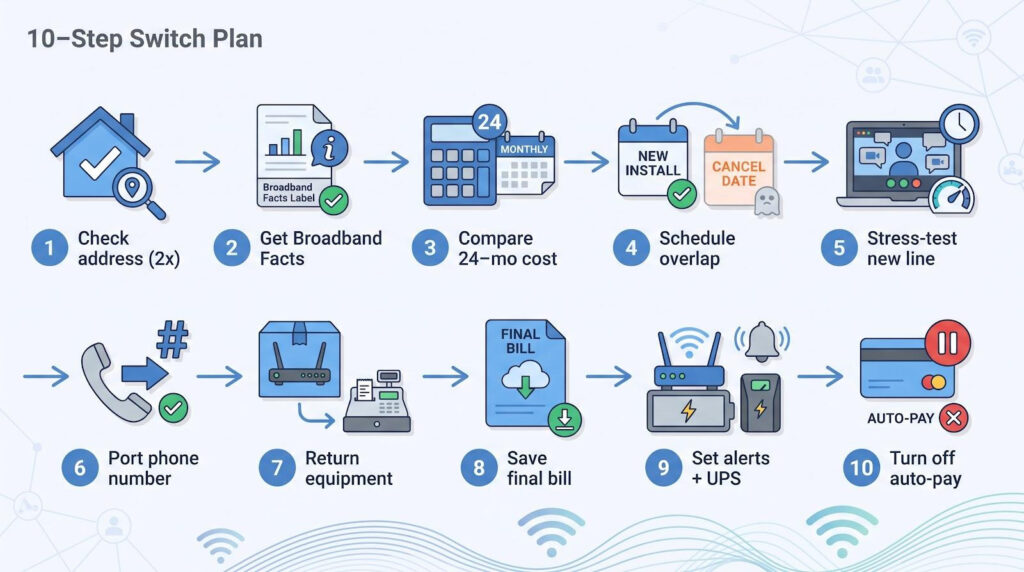
- Run the address check twice. Confirm service on the new provider’s tool, then cross-check the same address (unit number included) on the FCC National Broadband Map.
- Request the Broadband Facts label. It lists promo term, standard rate, equipment fees, and typical speeds, all essential for apples-to-apples comparisons.
- Calculate the 24-month cost. Add promo months, standard months, activation, and equipment, then divide by 24. Year-one bargains often hide year-two spikes.
- Book installation before canceling Xfinity. Overlap at least three days so you can test the new line while the old one stays live.
- Stress-test during work hours. Run video calls, upload files, and stream TV; better to expose a flaky splice while you still have backup.
- Port your phone number first. Ports take three to five business days, so start the process before scheduling the final disconnect.
- Return Xfinity gear in person. Drop the modem at a UPS Store or Xfinity retail hub, snap the receipt, and email it to yourself because billing disputes thrive on missing paperwork.
- Download the final bill. Grab the zero-balance PDF within 30 days in case a collection notice appears later.
- Set up outage alerts in the new provider’s app, and plug the new gateway into a small UPS so brief power blips don’t cut service during the handoff.
- Cancel auto-pay on your Xfinity profile. Drafts sometimes sneak through if you cancel near the billing cut-off.
Follow this script and your only downtime will be the two minutes it takes to swap Wi-Fi passwords on your smart bulbs.
Frequently asked questions
What is the best alternative to Xfinity in Charleston?
If fiber reaches your address, AT&T Fiber offers the best blend of speed, reliability, and reach. Where cable is the wired option, WOW! wins in West Ashley, James Island, and Mount Pleasant for its lifetime price lock, while Spectrum leads around Summerville.
Is fiber internet available downtown?
Yes, in pockets. AT&T serves many blocks north of Broad. Run an exact address check; historic buildings next door can flip from fiber to coax.
How fast is 5G home internet here?
Expect roughly 90–415 Mbps down and 15–60 Mbps up, depending on tower load and building materials. Place the gateway by a window and test at peak evening hours before canceling wired service.
What’s the cheapest no-contract plan?
Wired: Spectrum Internet 100 at $30/mo for year one. Wireless: T-Mobile 5G Home’s Rely plan at $50/mo with a five-year price guarantee.
Which provider is best for remote work?
Favor symmetrical uploads and low latency. AT&T Fiber and IQ Fiber meet both. If you must go wireless, keep a UPS-backed hotspot ready for tower congestion or power blips.
Can I keep my landline when I switch?
Yes. Ask the new provider to port the number before canceling Xfinity Voice. Ports take three to five business days; canceling first risks losing the line.
Conclusion
Charleston now offers a crowded field of wired, wireless, and satellite options that can replace Xfinity without sacrificing speed or reliability. Use the address checkers, price comparisons, and switch-over tips above to lock in the right plan for your home or business.


